
The Touchscreen Works on Your Desk. Why Does It Fail Inside the Machine?
Your projected capacitive touchscreen responds perfectly during sample testing. The display is clear, the interface is working, and every touch seems accurate.
Then you install it inside an industrial controller.
Suddenly, the screen misses touches, reacts unexpectedly or becomes less responsive when an operator wears gloves.
Is the touchscreen defective? Or has the operating environment changed the way it works?
For industrial HMI developers, this is an important distinction. A reliable industrial PCAP touch screen depends on more than the touch sensor alone.
01 | How Does a PCAP Touch Screen Work?
PCAP (Projected Capacitive Touch) detects touch by measuring changes in electrical capacitance.
Unlike a pressure-based resistive touchscreen, PCAP does not require the user to physically press two conductive layers together.
A typical mutual-capacitance touch sensor contains transmitting (TX) and receiving (RX) electrodes.
When a finger approaches the sensor, it changes the electrical coupling between the electrodes. The touch controller measures these changes and calculates the touch position.
The controller then communicates touch information to the host system through a compatible interface.
Simple explanation: Finger approaches the glass, capacitance changes, the controller identifies the touch, and the equipment responds.
This technology is commonly used in industrial control panels, smart home interfaces, embedded devices and touch-enabled instruments.
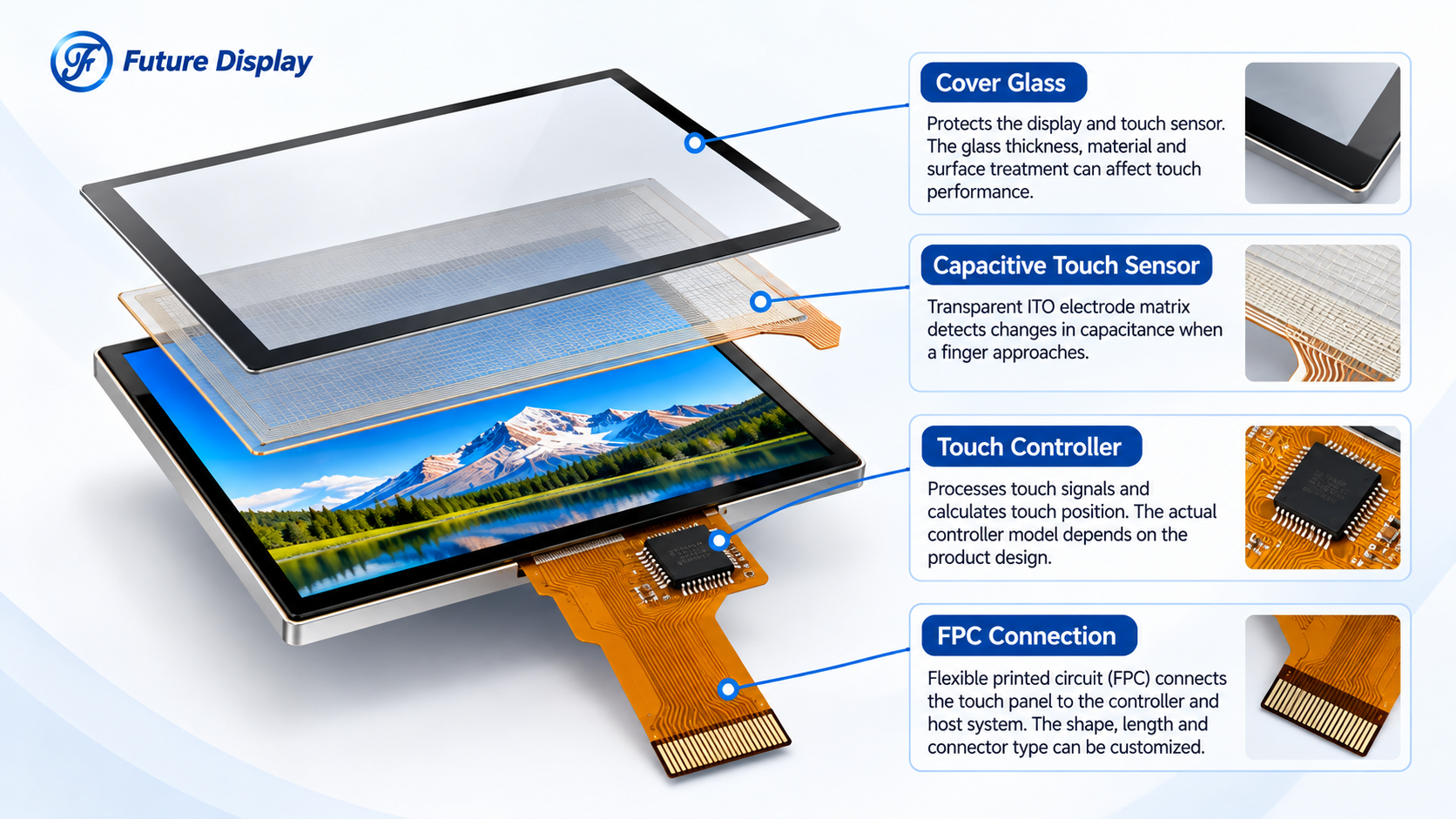
Industrial PCAP touch screen module showing cover glass, capacitive touch sensor, controller and FPC connection.
02 | Why Can PCAP Fail After Installation?
A PCAP module may operate correctly during bench testing but behave differently after it is installed in a complete machine.
Here are four important engineering factors.
Electrical Noise and EMI
Industrial equipment may contain switching power supplies, motors, backlight drivers and other electrical circuits.
Depending on the system design, electrical noise can interfere with touch measurements and reduce the signal-to-noise ratio.
Possible symptoms include missed touches, unstable coordinates or false touch events.
What to review: Power quality, grounding, FPC routing, shielding and touch controller configuration.
Cover Glass Thickness
PCAP sensors detect touch through a protective cover layer.
Increasing cover glass thickness or changing its material can affect the strength of the touch signal.
A thicker cover may require a suitable sensor design and controller sensitivity configuration.
What to review: Glass thickness, material, adhesive structure and the approved sensor-controller combination.
Glove Operation
Industrial operators may wear protective gloves during normal equipment operation.
Different glove materials and thicknesses influence capacitive coupling, so performance cannot be guaranteed by the term “PCAP” alone.
Some touch controllers can support glove operation when the complete design is properly configured and validated.
What to review: Glove type, thickness, required touch accuracy and operating conditions.
Water and Moisture
Water droplets may change electrical coupling across the touch surface.
Depending on the sensor arrangement and controller design, this may lead to false touch detection or reduced touch responsiveness.
Specialized touch solutions can improve water tolerance, but performance must be confirmed for the actual application.
What to review: Water exposure, condensation, enclosure sealing and touch behavior during wet testing.
03 | A Practical PCAP Troubleshooting Checklist
When a touch problem appears after assembly, engineers should examine the complete system before replacing the LCD module.
| Observed Problem | Possible Factors to Investigate |
|---|---|
| Unexpected touches | Electrical noise, moisture, controller tuning |
| Weak touch response | Cover glass, sensitivity, grounding |
| Glove touch not detected | Glove material, thickness, sensor design |
| Problems only after assembly | Mechanical integration, cables, enclosure grounding |
| Unstable operation near motors | EMI, power supply, routing and shielding |
Important: These are potential investigation directions, not confirmed diagnoses. Actual root causes must be established through engineering testing.
04 | Does Every PCAP Touchscreen Support Multi-Touch?
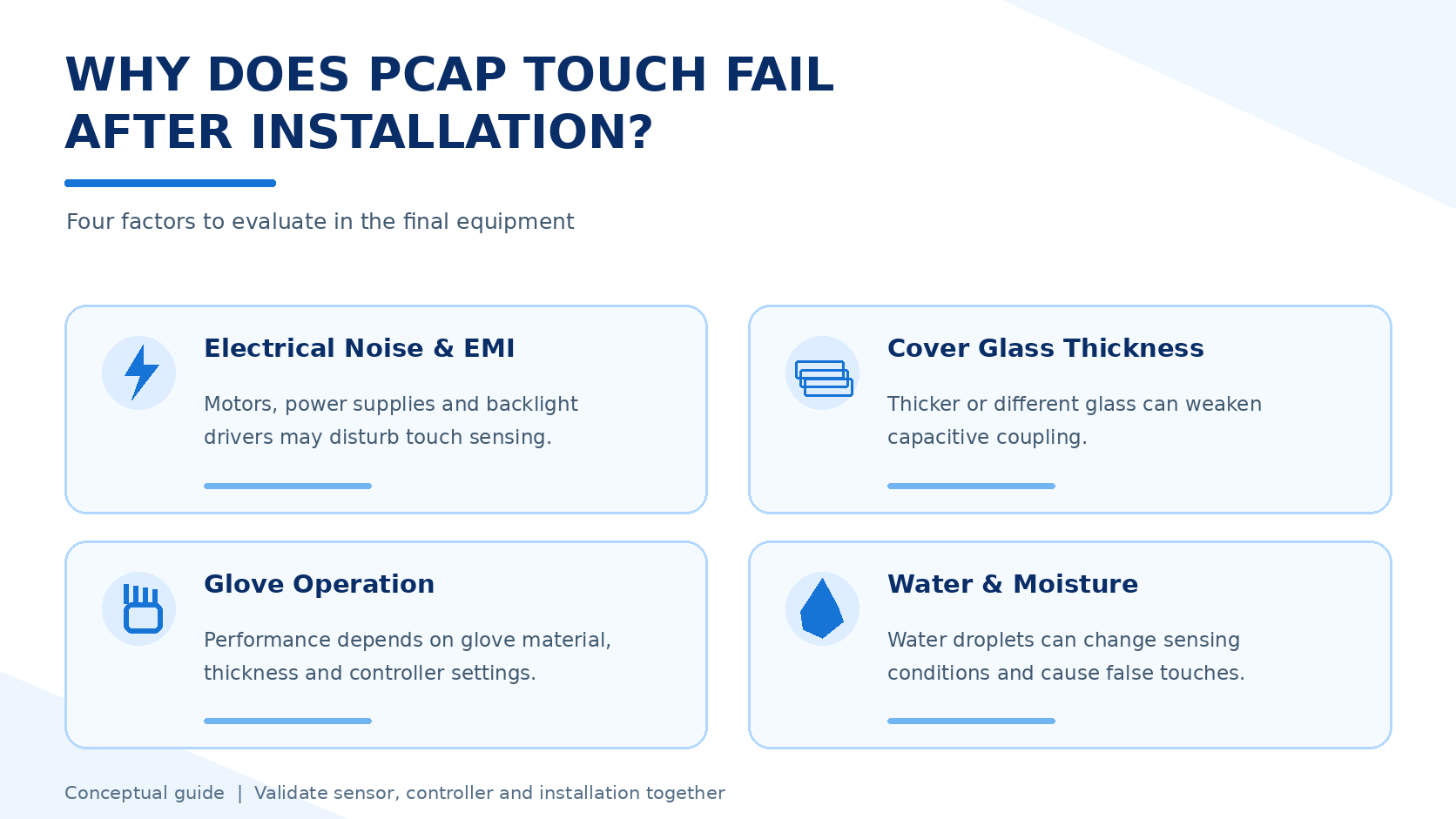
Industrial capacitive touchscreen troubleshooting guide illustrating EMI, cover glass, glove operation and moisture effects.
No. PCAP is a sensing technology, not a guarantee of a specific number of simultaneous touch points.
The supported touch count depends on the touch sensor, controller IC, firmware and host-system implementation.
Some applications need only a single touch input. Others require multi-touch gestures such as pinch-to-zoom or simultaneous control interactions.
Before choosing a module, confirm the actual touch-point requirement instead of assuming that every capacitive touchscreen supports ten-point touch.
05 | A Real Future Display PCAP Module Example
Future Display offers TFT modules with capacitive touch options for smart home controllers and embedded equipment.
One published example is:
3.95-Inch Square TFT LCD with Capacitive Touch
Model: FUT0395Q19H-ZC-A3
Resolution: 480 x 480
Display Interface: 2-Lane MIPI
Touch Controller: FT6336U
Touch Function: Single-touch and gesture input
Cover Glass: 0.70 mm tempered glass
Applications: Smart home HMI and industrial control interfaces
This example illustrates why a complete display specification matters.
Although the module uses capacitive touch technology, its published touch controller configuration is described for single-touch and gesture input rather than ten-point multi-touch.
It also shows why the display interface and touch controller should be evaluated separately. MIPI carries display information, while touch communication is handled through its own compatible controller connection.
Explore available TFT LCD modules with capacitive touch for additional product options.
06 | What Should Be Confirmed Before Production?
A successful touchscreen project needs more than a functional prototype.
Before approving a PCAP design for industrial equipment, consider the following:
- Touch requirements: Number of touch points, gestures and accuracy
- Cover structure: Glass thickness, material, printing and bonding
- Electrical integration: Touch controller, interface, FPC and grounding
- Operator conditions: Bare fingers, gloves or other intended inputs
- Environmental exposure: Moisture, temperature and contamination
- EMI/EMC: Interference during actual machine operation
- Validation: Touch performance after final equipment assembly
07 | How Future Display Supports Custom PCAP Projects
With display manufacturing experience since 2005, Hunan Future Electronics Technology Co., Ltd. supplies TFT LCD modules and customized display solutions for industrial and smart-device applications.
Our product range includes TFT modules with capacitive and resistive touch configurations, depending on the selected model.
For customized projects, our team can review:
- Display size and resolution
- Capacitive touch integration
- Cover glass dimensions and printing
- FPC routing and connector requirements
- Interface and controller compatibility
- Optical bonding and mechanical assembly
- Applicable sample evaluation requirements
Customization and touch performance depend on engineering feasibility and the approved project configuration.
Learn more about our OEM/ODM LCD customization services.
08 | Frequently Asked Questions About Industrial PCAP
Can PCAP support ten-point touch?
Some PCAP designs support ten-point touch or more, but this depends on the selected controller, sensor and system implementation. Always confirm the specific module requirements.
Can PCAP work through thick glass?
Potentially, yes. However, the glass thickness, material and sensor-controller design must be evaluated together.
Can a capacitive touchscreen work with gloves?
Some configurations can support glove operation. Compatibility depends on the glove and touch system, so sample testing is necessary.
Does optical bonding solve every touch problem?
No. Bonding can influence the optical and mechanical structure, but electrical noise, controller settings and system grounding require separate evaluation.
Why can PCAP behave differently inside an industrial machine?
Installation can introduce electrical noise, mechanical constraints and grounding conditions that were absent during bench testing. The complete system should be investigated.
Conclusion: Design for the Real Operating Environment
An industrial PCAP touchscreen should do more than respond correctly during a short demonstration.
It should be evaluated under the conditions in which the equipment will actually operate.
Touch reliability depends on the relationship between the sensor, controller, cover glass, electrical system and mechanical design.
The best time to address these factors is before the final product design is approved.
Developing a Custom TFT Touch Display?
Share your display size, cover glass requirements, touch-point needs, controller information and operating environment with Future Display.
Our team can review suitable TFT LCD and PCAP integration options for your project.
Email: info@futurelcd.com
Contact: Contact Future Display
Let’s evaluate your touch requirements before they become integration problems.
Post time: Nov-03-2026


