

Your touchscreen works perfectly with bare fingers. But what happens when the operator puts on thick gloves?
In a factory, workers may wear protective gloves while operating machines, checking instruments or adjusting production settings.
A touchscreen that responds smoothly in an office may be less convenient on the production floor.
For equipment with simple buttons and pressure-based controls, a resistive touch screen may be a practical solution.
But does resistive touch work with every glove? How long does it last? What happens to display brightness?
This guide explains the technology, important selection criteria and the information needed when requesting a custom industrial TFT LCD quotation.
01 | How Does a Resistive Touchscreen Work?
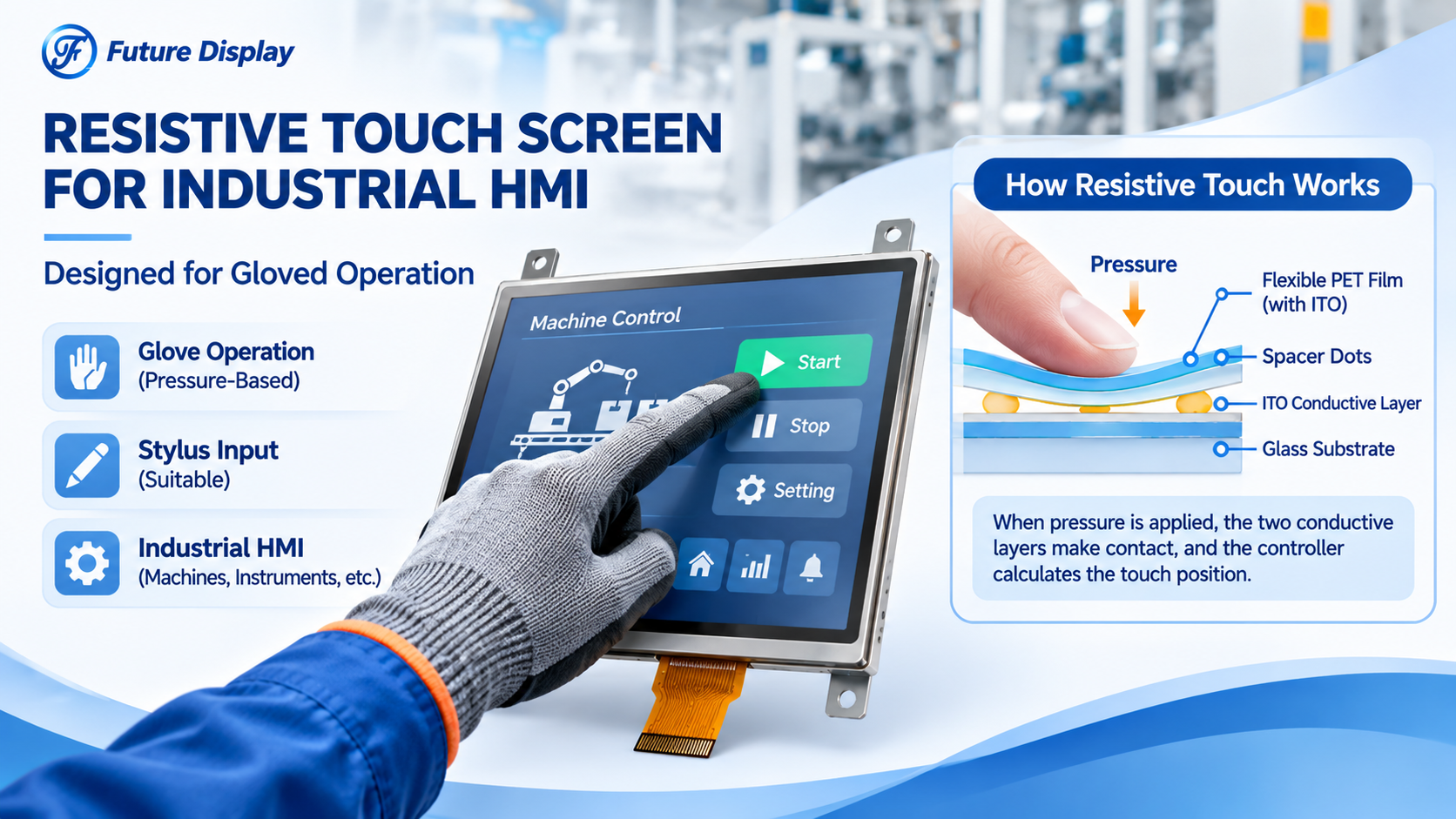
A typical analog resistive touchscreen contains two transparent conductive layers, often using indium tin oxide (ITO).
The layers are separated by insulating spacer dots.
When a finger, glove or stylus presses the flexible surface, the conductive layers make contact.
The touch controller uses the resulting electrical measurements to calculate the X and Y coordinates.
The basic process: Apply pressure, create electrical contact, measure the position and send the touch coordinates to the host system.
Unlike projected capacitive touch (PCAP), a conventional resistive touch panel does not rely on the operator’s finger being electrically conductive.
This is why resistive touch remains relevant for industrial equipment requiring glove or stylus operation.
02 | Can Resistive Touchscreens Work with Thick Gloves?
Generally, yes, provided the operator can apply sufficient pressure.
A conventional resistive touchscreen can respond to many non-conductive objects, including gloved fingers and suitable styluses.
However, different gloves can produce different results.
A thick, soft glove may spread the applied force across a larger surface. The touch panel may require a more deliberate press than when operated with a bare finger or narrow stylus.
Before approving a display for industrial use, evaluate:
- Glove material and thickness
- Required activation force
- Size of on-screen control buttons
- Touch accuracy near the panel edges
- Operator comfort during repeated use
Engineering Tip: Test the actual protective gloves used by the equipment operators, not only bare fingers in a laboratory.
03 | 4-Wire vs. 5-Wire Resistive Touch
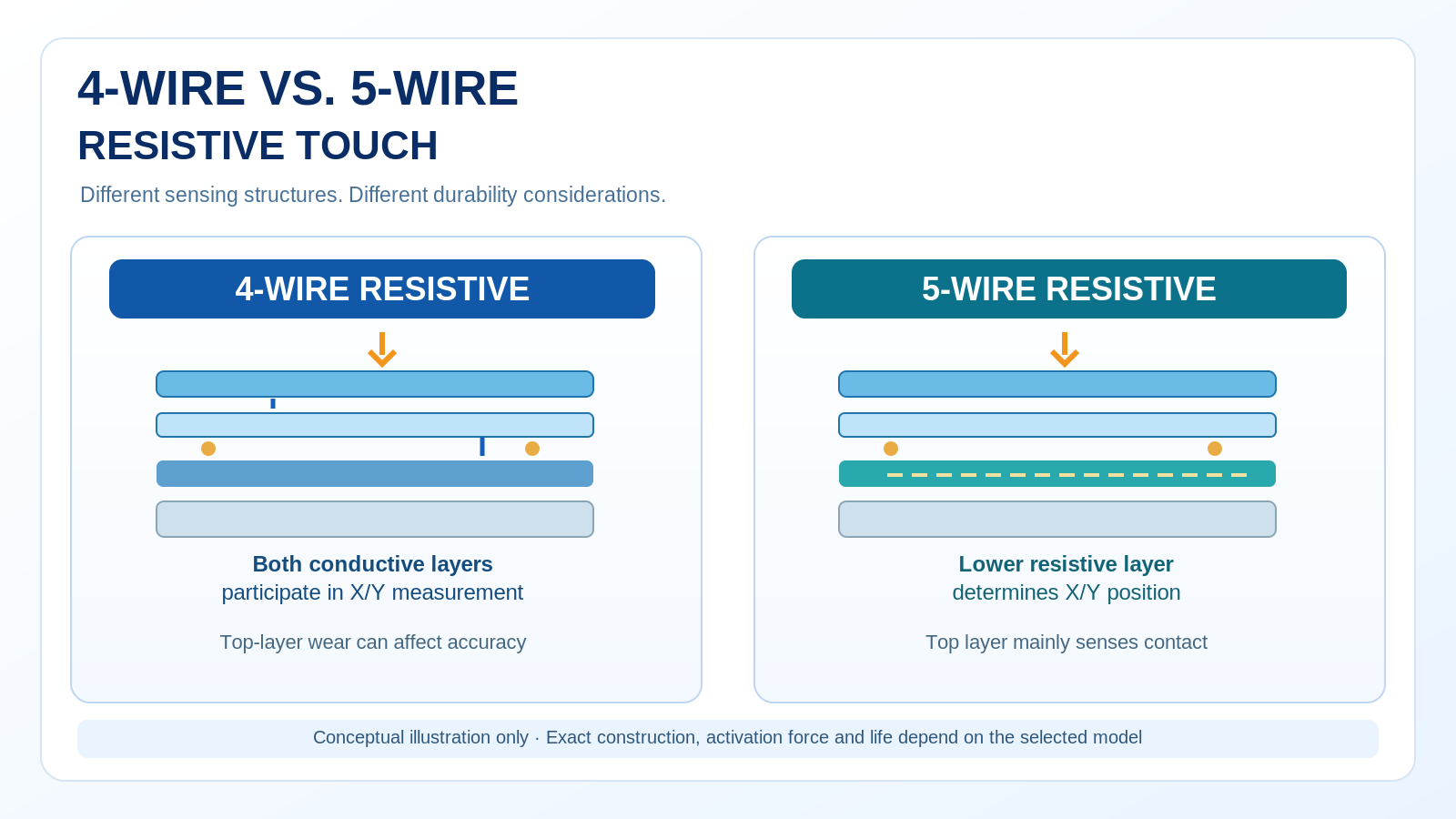
Four-wire and five-wire resistive touch panels are both established technologies, but their electrical structures differ.
| Feature | 4-Wire RTP | 5-Wire RTP |
|---|---|---|
| Position Measurement | Both layers participate | Primarily the lower resistive layer |
| Typical Cost | Often lower | Often higher |
| Durability | Depends on top-layer condition | Can offer better positional durability |
| Glove Input | Pressure-based | Pressure-based |
| Touch Functions | Usually single-touch | Usually single-touch |
Four-wire touch may be suitable for cost-sensitive equipment with straightforward single-touch requirements.
Five-wire technology can offer advantages in some applications where resistance to top-layer wear is important.
Neither configuration has a universal service-life guarantee. Durability depends on materials, usage and validated test conditions.
04 | Three Specifications You Should Never Ignore
Activation Force
Activation force describes the force required to register a touch.
If the required force is too high for the intended operator, the interface may become uncomfortable or difficult to use.
The appropriate value should be evaluated using the actual glove, stylus and operating conditions.
Touch Durability
Repeated pressing, dragging or stylus operation can gradually affect the flexible surface and its conductive structure.
Ask how the manufacturer defines touch durability, including the applied force, test tip and number of cycles.
A quoted touch-cycle figure is meaningful only when its test conditions are understood.
Light Transmittance
Resistive touch panels introduce additional transparent layers and optical interfaces over the LCD.
These layers can reduce transmitted light and affect the appearance of the final display assembly.
For equipment used in bright environments, compare the complete assembled display brightness rather than relying only on the bare TFT panel specification.
05 | A Real 5-Inch TFT LCD with Resistive Touch
Future Display offers TFT LCD modules with resistive touch configurations for embedded control applications.
One published example is the FUT0500WQ11Q-ZC-A1.
5.0-Inch TFT LCD with 4-Wire Resistive Touch
Model: FUT0500WQ11Q-ZC-A1
LCD Mode: TN, Normally White
Resolution: 480 x 272
Brightness: 350 cd/m² typical
Display Interface: 24-bit RGB
Connection: 40-pin FPC
Touch: 4-wire resistive
Operating Temperature: -20°C to +70°C
Specifications are based on the published Future Display product page. Confirm the latest approved datasheet before ordering.
This module is an example of combining a compact TFT display with pressure-based touch input.
It may be worth evaluating for industrial controllers, measurement equipment and machinery operator interfaces that require straightforward touch interaction.
However, the published information does not establish a specific thick-glove activation force, touch lifetime or optical transmittance. These requirements must be reviewed separately.
Explore the 5-inch TFT LCD with resistive touch for product information.
06 | Resistive or Capacitive Touch for Your Equipment?
Resistive and capacitive touch technologies are designed around different input methods.
Consider Resistive Touch When:
- Operators use thick protective gloves
- Controls mainly require single-point input
- A conventional stylus is needed
- Pressure-based operation fits the equipment design
Consider PCAP When:
- Multi-touch gestures are important
- The interface requires a rigid glass-front structure
- A highly interactive graphical interface is required
- Suitable glove and moisture performance can be validated
Touch technology should be chosen according to the operator, application environment and complete equipment design.
07 | Frequently Asked Questions
Can a resistive touchscreen be used with thick gloves?
Yes, many resistive touchscreens can be operated with gloves because they detect pressure. However, glove thickness, material and the required activation force should be tested with the actual equipment.
Does resistive touch require a special stylus?
Not necessarily. A suitable non-conductive stylus can activate a resistive panel by applying pressure. The tip material and force must be appropriate to avoid surface damage.
Can resistive touch support multi-touch?
Standard analog four-wire and five-wire resistive touch panels are generally used for single-touch operation. Special multi-touch resistive technologies exist, but they should not be assumed to be standard features.
How long does a resistive touchscreen last?
Lifetime depends on the panel design, operating conditions and touch frequency. Request tapping or writing durability specifications together with the related test method.
Does resistive touch reduce screen brightness?
The additional layers can reduce optical transmission. Evaluate the assembled module brightness and readability under the expected lighting conditions.
Is resistive touch suitable for outdoor equipment?
It can be considered for outdoor applications, but suitability depends on sealing, temperature, brightness, moisture exposure and other system requirements. Outdoor reliability must be validated for the final assembly.
Can Future Display customize TFT modules with resistive touch?
Future Display can review project-specific TFT and touch integration requirements, including suitable module selection, FPC routing and mechanical compatibility. Available modifications depend on engineering and manufacturing feasibility.
08 | From Touchscreen Selection to Custom Manufacturing
Future Display manufactures LCD modules and supports OEM/ODM display customization for industrial and embedded applications.
Our engineering team can review the relationship between the display module, touch panel, interface, FPC and mechanical structure.
For projects requiring resistive touch, we recommend defining the operator’s input method and testing requirements before confirming the final module.
Learn more about our custom LCD and display module solutions.
09 | Request a Quote for Your Resistive Touch Display
Already developing an industrial HMI, instrument display or embedded control product?
To help us review your project efficiently, please share the following information in your RFQ:
RFQ | Custom TFT LCD + Resistive Touch
Application: Industrial HMI / Instrument / Other
Display Size: Required diagonal size
Resolution & Interface: Required specifications or processor information
Touch Type: 4-wire / 5-wire / To be evaluated
Glove Operation: Glove material, thickness and intended use
Mechanical Requirements: Outline, FPC position, drawings or existing module
Operating Environment: Temperature, moisture, lighting and sealing requirements
Reliability Requirements: Activation force, touch durability and applicable test conditions
Order Information: Sample quantity, estimated annual demand and project schedule
Existing Files: Datasheet, CAD drawing or product photographs, if available
Send Your RFQ to Future Display
Email: info@futurelcd.com
Online Inquiry: Contact Future Display
Share your requirements so our team can evaluate a suitable display and touch configuration.
Conclusion: Design for the Operator, Not Just the Specification Sheet
Resistive touch remains a practical solution for equipment requiring glove operation, single-point input and pressure-based control.
But the technology alone cannot guarantee comfortable operation or long service life.
The right selection should consider activation force, optical transmission, touch durability and the final equipment environment.
Before choosing your next industrial touchscreen, start with how the operator actually uses it.
Future Display — Custom LCD & Touch Display Solutions
Post time: Nov-03-2026


